Visual macropad editor
Buttons and rotary knobs / encoders match your layout. Photoreal keycaps, per-layer LED glow, and clear selection states.
Program CH57x macropads and programmable mechanical macro keyboards on Windows — including cheap AliExpress keypads with knobs, rotary encoders, and OLED. Click a key, assign text, shortcuts, media, or recorded macros — then upload. No fuss.
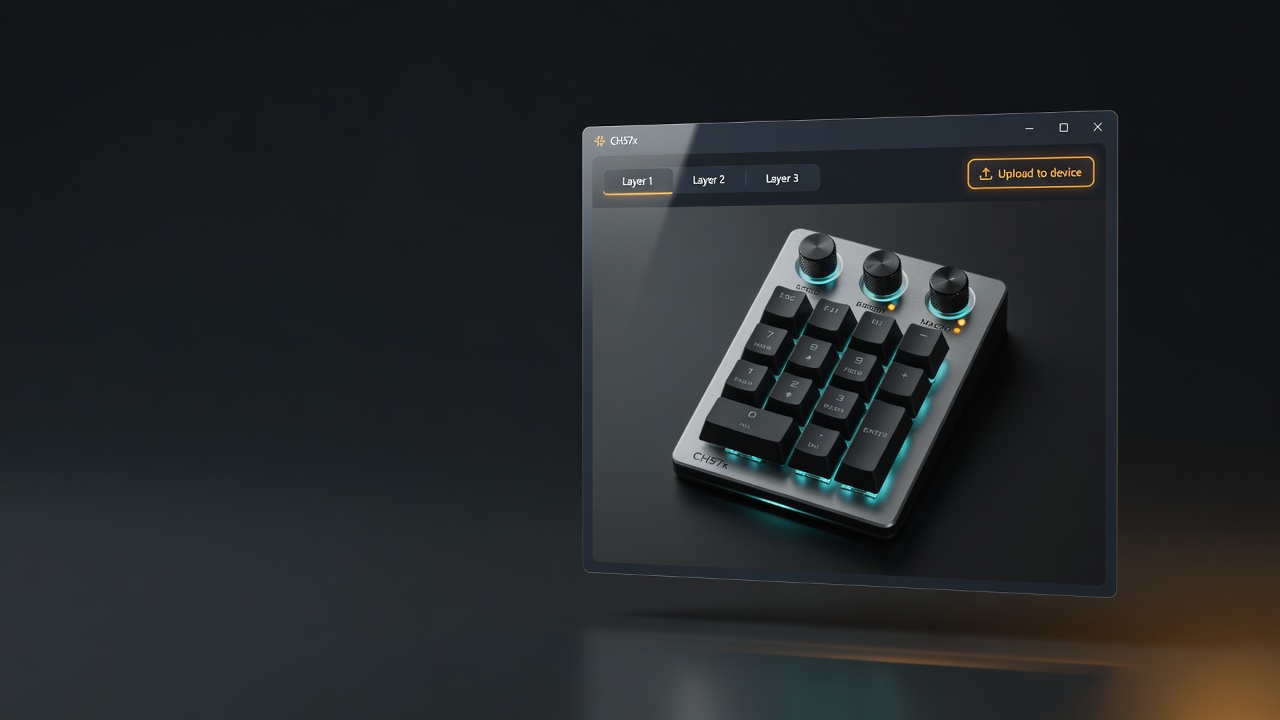
Everything you need to program a CH57x macropad or cheap programmable mechanical macro keyboard — keys, knobs, encoders, multi-step macros — in a dark, hardware-faithful editor.
Buttons and rotary knobs / encoders match your layout. Photoreal keycaps, per-layer LED glow, and clear selection states.
Type macros as text, capture a keystroke, record a timed sequence, pick media keys, or reuse library entries.
Save friendly labels for macros. Names restore after “Read from device” when the macro text matches.
Pull the current map from a connected pad, edit offline, then write it back over USB when you’re ready.
Apply backlight modes and colors (model-dependent) straight from Settings — no separate utility required.
Compatible with the CLI mapping format. Share configs, back them up, or version-control your layouts.
Five minutes if your layout matches the hardware.
Run the free Setup.exe. Self-contained — no separate .NET runtime. Install UsbDk for USB programming.
In Settings, set model, rows, columns, and knobs to match your physical pad.
Pick a key or knob, enter a macro (or record one), optional key name, then Apply.
Connect over USB and hit Upload to device. Session auto-saves for next launch.
Start free. Upgrade once when you need every layer and a bigger library — no subscription.
Try the full workflow on Layer 1
Download and install anytime
Unlock the whole pad
Lifetime license · personal use
After purchase via Stripe, your license key is sent by email. Open the app → Settings → License, paste the key, and Save. Questions? ch57xkeypad@gmail.com
Windows 10/11 · x64 · single Setup.exe installer
One installer file. Run CH57xKeypadToolbox-Setup.exe, pick a folder, get Start Menu / uninstall entries. On most PCs that already have .NET 8 Desktop Runtime (x64) it just works; install that free runtime once if Windows asks for it.
The installer is self-signed (publisher: CH57x Keypad). Chrome or Windows may still show a warning — choose Keep / More info → Run anyway if you trust this site. Support: ch57xkeypad@gmail.com.
CH57xKeypadToolbox-Setup.exe
~3 MB · signed installer
Already using free? Get ProShort answers to the questions we get most.
CH57x-based macropads and macro keypads — models such as ch57x-1 (VID 1189 / PID 8840, 8842, 8850), ch57x-2 (8890), and ch57x-3. That covers many cheap AliExpress / Amazon programmable mechanical macro keyboards with knobs, rotary encoders, and sometimes OLED. Set model and layout in Settings to match your hardware.
If the pad is a CH57x-style USB macropad or macro keypad (common “programmable mechanical macro keyboard” listings with mini keys and encoder knobs), yes — use the matching model (ch57x-1 / 2 / 3) and rows, columns, and knob count. Many low-cost pads from AliExpress use the same chips and protocol.
Yes for knobs and rotary encoders: map clockwise, counter-clockwise, and press actions per layer. OLED screens are driven by the hardware firmware; this toolbox programs the key and encoder macros (and LED modes where the device supports them).
Programming the pad uses low-level USB access. On Windows, UsbDk provides that path — the same requirement as the original open-source command-line tools.
Full editor workflow on Layer 1, up to 10 saved library items, read/upload, YAML, and LED for layer 1. Layers 2–3 and unlimited library require Pro.
Buy a license, then enter the key under Settings → License in the app and Save. Limits unlock immediately — no reinstall needed.
No. Pro is a one-time purchase for a personal license.
Yes. Load from File / Save to File uses the same mapping format as the CLI port of ch57x-keyboard-tool.
Email ch57xkeypad@gmail.com for license questions, hardware issues, or feature feedback. Include your Windows version and keypad model (VID/PID if you know it) when reporting a problem.
Free Windows software for macro keypads, cheap AliExpress pads, and programmable keyboards with knobs. Upgrade to Pro when you need every layer.